The Imaging Resource
Quick Review
Canon PowerShot S410 Digital ELPH Camera
 |
Camera QuickLook | |
|
Review Date |
|
|
|
User Level |
|
|
|
Product Uses |
|
|
|
Digicam Design |
|
|
|
Picture Quality |
High, 4.0-megapixel CCD | |
|
Print Sizes |
4x6, 5x7, 8x10, 11x14 inches | |
|
Availability |
|
|
| Suggested Retail
Price (At introduction) |
|
|
Introduction
|
||||||||||
The Canon PowerShot S410 is the latest in the highly popular line of "Digital
ELPH cameras from Canon. Canon's name is one of the few needing no introduction
in the world of photography: Ask a photographer, be they professional or amateur,
to name the first couple of camera manufacturers that they can think of, and
chances are that Canon would be at or near the top of the list. In the digital
arena, Canon has continued their history of innovation, with a broad line of
products ranging from entry-level models all the way to no-holds-barred digital
SLRs for professional photographers. In the consumer arena, their products are
distinguished by superb design, sharp lenses, and excellent color.
In both the film and digital worlds, Canon has become known for their high-style,
diminutive "ELPH" cameras. Long a popular brand for APS film cameras,
Canon brought the ELPH size and styling to the digital world with the original
S100. The PowerShot S410 is the updated version of last year's S400 model, carrying
over a variety of improvements that first appeared in the previous model, including
a Center-Weighted metering mode option, faster maximum shutter speed (1/2,000
second), and improved macro capabilities, adding a print share button. With
the same great user interface common to Canon cameras and point-and-shoot operation
driven by their dedicated image processors, the S410 is sure to please a host
of consumers.
Near-Identical Twins: The Canon PowerShot S410 and S500
If you've already seen my review of the Canon
PowerShot S500, you can save yourself some reading here, as the two cameras
are virtually identical, apart from the obvious resolution difference (4 megapixels
for the S410, 5 megapixels for the S500). Other than resolution, here are the
main differences I found between the two models. Compared with the S500, the
S410 has:
- Slightly lower resolution. (No surprise there, 4 megapixels vs 5.)
- Slightly less contrast under harsh lighting. (A good feature, but the difference is pretty minor.)
- Somewhat better flash color balance under incandescent lighting. (A pretty noticeable difference.)
- Slightly less image noise. (A slight difference.)
- A somewhat shorter flash range. (A pretty noticeable difference.)
- Slightly faster cycle time. (A very minor difference.)
- No 640x480 resolution movie mode. (An issue, if you like high-res movies.)
- A retail price (at introduction) that's about $100 less (making it a noticeably
better deal.)
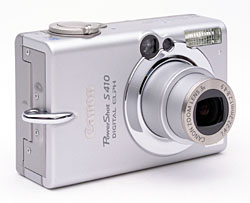
The new flagship of Canon's digital ELPH series, the PowerShot S410 continues the line's small dimensions, stylish looks, and quality metal construction. Portable and quick on the draw (thanks to its smooth retractable lens design), the S410 offers point-and-shoot control with a goodly handful of extra exposure features. The S410's flat front panel (with lens retracted) makes the camera pocket friendly, while the magnesium body keeps the camera light weight. Equipped with a 4.1-megapixel CCD (4.0 effective), the S410 captures high quality images, suitable for printing snapshots as large as 8x10 inches with very good detail. Smaller resolutions are also available for email transmission, and a movie mode with sound captures short videos.
The S410 features a 3x, 7.4-22.2mm glass zoom lens, equivalent to a 36-108mm zoom on a 35mm camera, the same as the lens featured on its predecessor, the S400. Aperture is automatically controlled, but the maximum setting ranges from f/2.8 at full wide angle to f/4.9 at full telephoto. A maximum 3.6x digital zoom option increases the S410's zoom capabilities to 11x, but keep in mind that digital zoom decreases the overall image quality, as it simply crops out and enlarges the center pixels of the CCD's image. Image noise is likely to be higher with digital zoom, and details considerably softer. Focus ranges from 1.5 feet (46 centimeters) to infinity in normal AF mode, and from 2.0 inches to 1.5 feet (5 to 46 centimeters) in Macro mode. An Infinity fixed-focus mode is also available. The S410 uses Canon's sophisticated, nine-point AiAF (Artificial Intelligence Autofocus) system to determine focus, which uses a broad active area in the center of the image to calculate the focal distance. Also built-in to the S410 is an AF assist light, which aids the focus mechanism in low lighting. For composing images, the S410 has a real-image optical viewfinder, as well as a 1.5-inch color LCD monitor. The LCD reports a fair amount of camera information, but excludes exposure information such as aperture and shutter speed. In Playback mode, a histogram display reports the tonal distribution of a captured image, useful in determining any over and under-exposure.
Like the rest of the ELPH line, exposure control is automatic. The S410 does provide some manual adjustments, however, as well as a range of exposure modes for specific shooting situations. The Mode dial on the rear panel controls the main operating mode, offering Auto, Manual, Stitch-Assist, and Movie modes. A Mode switch on the back panel offers Record and Playback settings. Shutter speeds range from 1/2,000 to 15 seconds, with the 1.3- to 15-second end of the range only available in Long Shutter mode (which also automatically invokes a Noise Reduction system to eliminate excess image noise in longer exposures). In straight Auto mode, the camera essentially controls everything about the exposure except for file size, flash, etc. Manual mode provides more hands-on control, with White Balance, Exposure Compensation, ISO, and a host of creative effects. Camera operation is straightforward and simple, as you typically point and shoot most of the time. Halfway pressing the Shutter button sets focus and exposure, and the small LEDs next to the optical viewfinder let you know when the camera is ready to take the picture.
The S410 uses an Evaluative metering system, which means that the camera divides the image area into zones and evaluates each zone to determine the best overall exposure. A Spot metering option ties the exposure to the very center of the frame, and is useful for off-center or high contrast subjects, as you can pinpoint the exact area of the frame to base the exposure on. There's also a Center-Weighted metering option, which bases the exposure on a large area in the center of the frame. (The manual makes a mistake and shows the spot icon for both evaluative and spot metering modes, so be sure to notice the order as you scroll through the options: Evaluative is first, then Center, then Spot. With spot mode selected, a small bracket appears in the center of the LCD.) Exposure Compensation lightens or darkens the overall exposure from -2 to +2 exposure equivalents (EV) in one-third step increments. A White Balance option offers Auto, Daylight, Cloudy, Tungsten, Fluorescent, Fluorescent H, and Custom (manual) settings. The S410 also offers a creative Photo Effects menu, which adjusts sharpening, color, and saturation. Sensitivity equivalents include 50, 100, 200, and 400 ISO settings, as well as an Auto adjustment. The S410's built-in flash operates in Auto, Forced On, Suppressed, Red-Eye Reduction, and Slow-Synchro modes. You can also lock the flash exposure in a similar manner to locking normal exposure. Halfway pressing the Shutter button and keeping it pressed initiates the exposure lock, signaled by two beeps, then you press the metering mode button, and an "FEL" icon appears in the LCD monitor as a preflash is fired. FEL stays in effect until the Shutter button is released or fully pressed so the photographer can recompose.
A two- or 10-second self-timer option counts down by flashing a small LED on the front of the camera before firing the shutter, giving you time to duck around the camera and get into the shot. (The two-second option is handy for times when you want to prop the camera to avoid the blurring that can come from hand-holding long exposures, but don't want to wait for the full 10-second countdown to elapse.) Stitch-Assist mode is the S410's panoramic shooting mode. The series of images can then be "stitched" together into one panoramic frame with the accompanying software. The S410 also has an improved Movie record mode, which records moving images with sound for as long as three minutes per clip, depending on the resolution setting and amount of memory card space. (Movies are recorded at either 320 x 240, or 160 x 120 at 15 frames per second for up to three minutes.) Finally, an improved Continuous Shooting mode captures a series of consecutive images (much like a motor drive on a traditional camera), at approximately 1.5 frames per second, for as long as the Shutter button is held down. The actual frame rate will vary with the resolution setting, and the total number of images will depend on the amount of memory card space available, as well as the file size. Through the Record menu, a High Speed Continuous Shooting mode is also available, capturing images as fast as 2.5 frames per second, slightly faster than the S500, likely due to the smaller file size produced by the 4 megapixel imager on the S410.
The My Camera settings menu lets you customize camera settings to a specific theme. Everything from the startup image to operating sounds can be assigned to a theme, either one of the pre-programmed themes or one downloaded from the camera software. You can also use shots on the CF card as startup images and record your own sounds right from the camera to substitute for the system sounds. A great way to make your camera too annoying for others in the family to use. The sounds and pictures are "registered" to the camera so that no matter what card is in use, the sounds and pictures remain. The S410 also lets you record short sound clips to accompany captured images, via the Sound Memo option, great for lively captions to vacation photos or party shots.
The S410 stores images to CompactFlash Type I memory cards. A 32MB card accompanies the camera, but I'd recommend picking up a (much) larger capacity card right along with the camera, as CompactFlash cards are available as large as one gigabyte, and the S410's 4-megapixel images take up a fair bit of space. The camera utilizes a rechargeable lithium-ion battery pack for power, which accompanies the camera, along with the necessary battery charger. Because the S410 does not accommodate AA-type batteries in any form, I'd advise picking up an additional battery pack and keeping it freshly charged. The optional AC adapter is useful for preserving battery power when reviewing and downloading images, and actually has a "dummy" battery that inserts into the camera's battery compartment. A USB cable and interface software are also packaged with the camera, for downloading images to a computer and performing minor organization and corrections. Two software CDs provide the necessary drivers and editing software, both compatible with Windows and Macintosh platforms. One CD holds Canon's Digital Camera Solution Disk version 16.0 and the other features ArcSoft's Camera Suite version 1.3. Finally, an A/V cable can connect the S410 to a television set, for reviewing and composing images. The S410 is DPOF (Digital Print Order Format) compatible, with detailed print settings in the Playback menu. Canon offers a selection of direct-connect printers as well, which simplifies printing even more.
Basic Features
- 4.0-megapixel CCD.
- Real-image optical viewfinder.
- 1.5-inch color TFT LCD monitor.
- Glass, 3x, 7.4-22.2mm lens, equivalent to a 35-105mm lens on a 35mm camera.
- Maximum 4.1x digital zoom.
- Automatic exposure control, with Long Shutter mode for longer exposures.
- Shutter speeds from 1/2,000 to 15 seconds.
- Maximum aperture f/2.8 to f/4.9, depending on lens zoom position.
- Built-in flash with five modes.
- CompactFlash Type I memory card storage, 32MB card included.
- Power supplied by a rechargeable lithium-ion battery pack (charger included) or optional AC adapter.
- ArcSoft Camera Suite 1.3, Canon Digital Camera software, and USB drivers included for both Windows and Mac platforms.
Special Features
- Movie mode with sound.
- Standard and High Speed Continuous Shooting modes.
- Stitch-Assist panorama mode.
- Infinity and Macro focus modes.
- Customizable "My Camera" settings.
- Two- or 10-second Self-Timer for delayed shutter release.
- Sound Memo option for recording captions.
- Spot, Center-Weighted, and Evaluative exposure metering.
- White balance (color) adjustment with seven modes, including a Custom setting.
- Photo Effect menu for color adjustment.
- Adjustable ISO setting.
- DPOF (Digital Print Order Format) compatibility.
- USB cable for connection to a computer (driver software included).
- A/V cable for connection to a television set.
Recommendation
The Canon ELPH series of digicams remains a popular option for many consumers, given its members' tiny size and reputation for good quality. The PowerShot S410 Digital ELPH updates the line with a 4.0-megapixel CCD for higher resolution images. The increased resolution lets you print images as large as 8x10 inches with very good detail, and lower resolution settings are good for printing snapshots or sending to family and friends via email. Though exposure control is mainly automatic, the availability of exposures up to 15 seconds and adjustable ISO increases the camera's exposure versatility. The uncomplicated user interface makes novices and more advanced amateurs alike feel at home, with enough variable exposure control to make both happy.
Practically identical to the PowerShot S400 and S330 before it, the S410 continues with the small dimensions that made the ELPH line so popular. The compact size is perfect for quickly stashing in a pocket or purse without worrying about any damage to the camera, though I recommend a case to avoid scratches and accidental activation. The retracting lens is a smart design that keeps the camera front completely flat when the camera is off, underscoring the camera's pocket friendly design, while an automatic lens cover means you don't have to worry about smudging the lens or losing the lens cap. Measuring 3.4 x 2.2 x 1.1 inches (87 x 57 x 28 millimeters), and weighing a mere 6.5 ounces (185 grams) without battery or media, the S410 is identical in both size and weight to the S400.
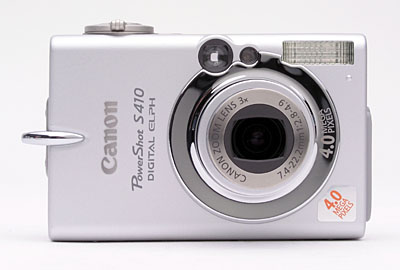
The front of the S410 is distinctively ELPH, with the lens off-center slightly toward the right, and viewfinder, and flash just above it. A light emitter, next to the optical viewfinder, serves multiple purposes, including autofocus assist, red-eye reduction, and the self-timer countdown. The camera's telescoping lens moves into place quickly when the camera is powered on, and retracts fully within the camera to maintain a flat profile. A small, notch from the wrist strap eyelet is about all the finger-grip provided, though the accompanying wrist strap should provide a more secure feel.
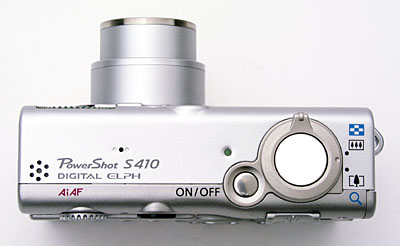
The Shutter button, Zoom lever, and Power button are all on top of the camera, protruding slightly from the surface. There's also a tiny microphone for recording sound with movies, and a speaker for playback.
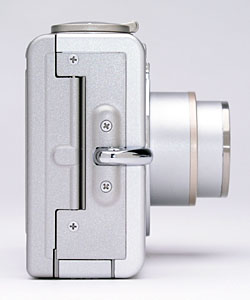
On the right side of the camera (as viewed from the rear) are the wrist strap attachment and the CompactFlash slot, the latter of which fits securely beneath a locking plastic door. The release lever for the card slot is actually on the camera's back panel.
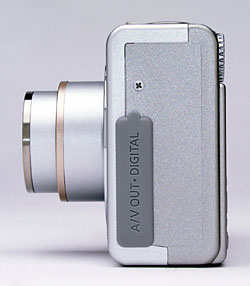
The opposite side of the camera simply holds the USB and A/V output jacks, which are protected by a snug rubber cover.
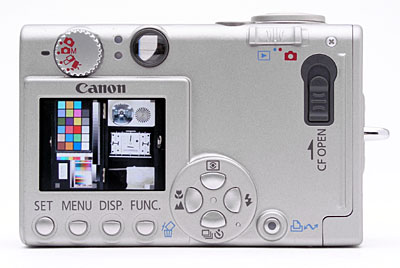
The remaining camera controls are on the back panel, along with the optical and LCD viewfinders. A small ridge along the right side provides a slight thumb grip and reinforces the finger grip on the front of the camera when shooting one-handed (for small to medium hands, those with larger hands may have a little difficulty negotiating the controls, which are a little close together). Lining the bottom side of the LCD monitor are the Set, Menu, Display, and Function buttons, with a Four-Way Arrow pad just to the right of these. A sliding switch on the right side releases the CompactFlash slot door, and a Mode switch accesses Record and Playback modes. Directly above the LCD monitor is the Exposure Mode dial. Two LED lamps next to the viewfinder report camera status, lighting to indicate when focus is set or the flash is fully charged.
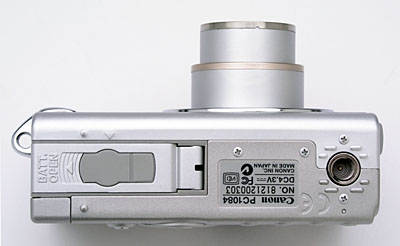
The S410 features a nice, flat bottom panel, which holds the metal tripod mount and the battery compartment. I don't usually like to see the tripod mount so far over to the side of the camera because the weight of the camera, placed off-center on the tripod head, can overly stress the mount threads. Given the S410's tiny size and the solid metal tripod socket (kudos for that), this may not be a concern. One consequence of having the tripod socket so close to the edge though, is that the camera may not rest level on some tripod heads. (Again, a minor concern, since you can usually just tilt the tripod to align the camera however you'd like.) The locking battery compartment cover slides open and then outward, with a small, rubber flap in the center of the compartment door. This flap covers a hole in the battery compartment cover provided to allow access to the connector jack in the "dummy battery" used in the AC adapter kit. (Like many other Canon digicams, the S410's AC adapter scheme employs a dummy battery that fits into the battery compartment, and which provides a plug for the AC power converter's cable.)
The S410's user interface is very straightforward and relatively uncomplicated, like the rest of the ELPH series. Most of the camera's functions are controlled by the control buttons on the top and the back panel, while a handful of settings are controlled through the LCD based Record menu. A Function menu provides faster access to basic settings like image size, quality, and exposure compensation, without sifting through menu screens. The LCD menu system itself is efficient on the S410, as you scroll through menu items on-screen instead of through a series of pages. Additionally, the Setup and My Camera menus are always available, regardless of the camera mode. Even if the LCD monitor is switched off, pressing one of the control buttons on the back panel (such as the Exposure Compensation or Flash buttons) activates the display temporarily, so you can save battery power by switching off the LCD monitor. With the instruction manual in-hand, it shouldn't take more than a half an hour to an hour to get comfortable with the camera.
Record-Mode Display
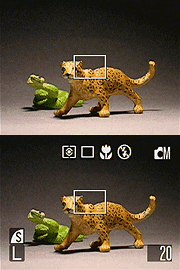 In
record mode, the LCD monitor displays the subject with a modest amount of overlaid
information, indicating exposure compensation, flash, white balance, effects,
and ISO settings, current size/quality setting, number of images that can be
stored on the remaining memory card space at the current size/quality, and the
current metering and continuous/single shot shooting mode configuration. Pressing
the DISP button beneath the LCD once turns the LCD off entirely, pressing it
again turns the LCD back on, but with the information overlay suppressed, and
pressing it a third time restores the default display. When you half-press the
shutter button, one or more focus-area rectangles will be highlighted in green
(one or more if in AiAF autofocus mode, only one in the center when in non-AiAF
focus mode), and a "shaking hand" symbol will appear in the lower
left hand corner if the shutter speed is slow enough that you'll need to be
careful not to jiggle the camera during the exposure.
In
record mode, the LCD monitor displays the subject with a modest amount of overlaid
information, indicating exposure compensation, flash, white balance, effects,
and ISO settings, current size/quality setting, number of images that can be
stored on the remaining memory card space at the current size/quality, and the
current metering and continuous/single shot shooting mode configuration. Pressing
the DISP button beneath the LCD once turns the LCD off entirely, pressing it
again turns the LCD back on, but with the information overlay suppressed, and
pressing it a third time restores the default display. When you half-press the
shutter button, one or more focus-area rectangles will be highlighted in green
(one or more if in AiAF autofocus mode, only one in the center when in non-AiAF
focus mode), and a "shaking hand" symbol will appear in the lower
left hand corner if the shutter speed is slow enough that you'll need to be
careful not to jiggle the camera during the exposure.
Playback-Mode Display
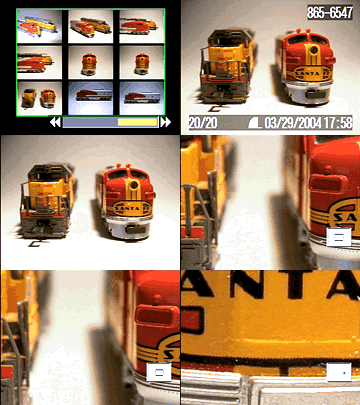 In
playback mode, the default image display shows the most recently captured image,
with an information overlay showing the resolution and quality setting used,
the date and time of capture, the file number, and the sequence number of the
image among those currently stored in the memory card. Pressing the Display
button once shows more information and an overlaid histogram, pressing it a
second time dismisses the information overlay, and pressing it a third time
restores the default display. With an image displayed full-screen, pressing
the zoom control in the wide-angle direction once brings up a 9-image thumbnail
display, pressing it again adds a scroll bar at the bottom of the screen, and
sets the forward/back arrow keys to jump through the recorded images 9 at a
time. Conversely, pressing the zoom control in the telephoto direction steps
back up out of a thumbnail display, and then continues on to zoom into a single
image by as much as 10x, to inspect fine details. The playback zoom normally
happens in fairly fine steps, but holding down the SET button while toggling
the zoom control changes the action to zoom in fairly large steps, of 2.5, 5,
and 10x. When zoomed in, a handy little "navigator" overlay in the
lower right hand corner shows you what part of the image you're currently looking
at. When zoomed in, the arrow keys scroll your magnified view around the image
as a whole.
In
playback mode, the default image display shows the most recently captured image,
with an information overlay showing the resolution and quality setting used,
the date and time of capture, the file number, and the sequence number of the
image among those currently stored in the memory card. Pressing the Display
button once shows more information and an overlaid histogram, pressing it a
second time dismisses the information overlay, and pressing it a third time
restores the default display. With an image displayed full-screen, pressing
the zoom control in the wide-angle direction once brings up a 9-image thumbnail
display, pressing it again adds a scroll bar at the bottom of the screen, and
sets the forward/back arrow keys to jump through the recorded images 9 at a
time. Conversely, pressing the zoom control in the telephoto direction steps
back up out of a thumbnail display, and then continues on to zoom into a single
image by as much as 10x, to inspect fine details. The playback zoom normally
happens in fairly fine steps, but holding down the SET button while toggling
the zoom control changes the action to zoom in fairly large steps, of 2.5, 5,
and 10x. When zoomed in, a handy little "navigator" overlay in the
lower right hand corner shows you what part of the image you're currently looking
at. When zoomed in, the arrow keys scroll your magnified view around the image
as a whole.
External Controls
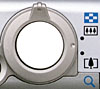
Shutter Button: Located on the top panel, this button sets focus and exposure
when halfway pressed and fires the shutter when fully pressed. If the Self-Timer
is activated, a full press of the Shutter button triggers the 10-second countdown.
Zoom Lever: Surrounding the Shutter button on the camera's top panel, this lever controls the optical and digital zoom in any record mode. In Playback mode, the wide-angle end activates an index display, while the telephoto setting enlarges captured images for closer inspection of fine details.
Power Button: To the left of the Shutter button on the camera's top
panel, this button turns the camera on or off.

Mode Dial: Just above the LCD monitor on the rear panel, this dial controls
the camera's exposure mode. One problem I found with the mode dial is that it's
a little too easy to activate it accidentally, switching the user into an unexpected
mode. The dial offers the following selections:
- Automatic Exposure Mode: Places the camera in charge of all exposure decisions, with the exception of image size/quality, flash mode, macro focusing, and the Self-Timer.
- Manual Exposure Mode: Allows more exposure control by the user, such as Exposure Compensation and White Balance settings. The camera still determines the shutter speed and aperture settings however.
- Stitch Assist Mode: Sets up the camera for capturing a series of still images, to be "stitched" together into a panoramic image on a computer after capture.
- Movie Mode: Captures moving images with sound, depending on the mode and card size, the movie can be as long as the card will hold.
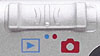
Mode Switch: In the top right corner of the rear panel, this switch puts
the camera into Record or Playback modes.
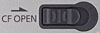
CF Open Latch: Just below the Mode switch on the rear panel, this sliding
latch opens the CompactFlash card slot. Unfortunately, the door is positioned
such that it's difficult to remove the CF card, because the small lip on the
back edge of the card faces the door, rather than the back of the camera. (Better
to get a big one and use the USB cable to transfer cards if you want to avoid
this problem.)

Metering Button (Up Arrow Key): As the top button in the Four-Way Arrow
pad in the lower right corner, this button cycles through Evaluative, Center-Weighted,
and Spot metering modes. In any settings menu, this button navigates through
options and selections.

Macro/Infinity Button (Left Arrow Key): Pointing to the left in the arrow
key pad, this control cycles between Macro, Infinity Focus, and normal focusing
modes while in Record mode. In both Playback and Record menus, it acts as the
left arrow key to navigate through menu items. In Playback mode, this button
scrolls backward through captured images.

Flash Button (Right Arrow Key): Pointing to the right in the arrow key pad,
this button cycles through three of the available flash modes (options may change
depending on the exposure mode selected):
- Automatic: The camera determines when to fire the flash based on existing light levels.
- Forced On: The flash always fires, regardless of lighting conditions.
- Forced Off: The flash never fires, regardless of lighting conditions.
- Red-Eye Reduction: Fires a small pre-flash before firing the full flash, to reduce the occurrence of Red-Eye in portraits.
- Slow-Sync: Times the flash with a slower shutter speed, to allow more ambient light into dark exposures.
In both Playback and Record menus, this button acts as the right arrow key to scroll through menu items. In Playback mode, this button scrolls forward through captured images.

Continuous/Self-Timer Button (Down Arrow Key): The final button on the key
pad, this button cycles through Single, Continuous, and Self-Timer shooting
modes while the camera is in Record mode. In both Playback and Record menus,
this button serves as the down arrow key to navigate through menu items.

Function / Erase Button: To the left of the circular key pad, this control
activates the Function menu in any record mode. The following options are available:
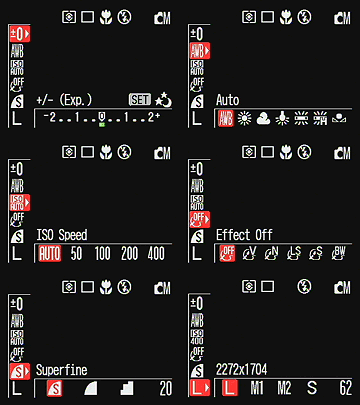 Exposure Compensation:
Increases or decreases the exposure from -2 to +2 exposure equivalents (EV)
in one-third-step increments.
Exposure Compensation:
Increases or decreases the exposure from -2 to +2 exposure equivalents (EV)
in one-third-step increments.- White Balance: Controls the color balance of images. Options are Auto, Daylight, Cloudy, Tungsten, Fluorescent, Fluorescent H, and Custom (manual setting).
- ISO Speed: Sets the camera's sensitivity to Auto, or to 50, 100, 200, or 400 ISO equivalents.
- Photo Effect: Enables Vivid Color, Neutral Color, Low Sharpening, Sepia, or Black-and-White picture effects.
- Compression: Sets the JPEG compression to Superfine, Fine, or Normal.
- Resolution: Specifies the image resolution. Still image resolutions are 2,592 x 1,944; 2048 x 1536; 1,600 x 1,200; 1,024 x 768; and 640 x 480 pixels. Movie resolutions are 640 x 480, 320 x 240, and 160 x 120 pixels.
In Playback mode, this button pulls up the single-image erase menu, which deletes the currently-displayed image (unless write-protected).

Display Button: On the left side of the Function / Erase button, this button
turns the LCD image and information displays on and off. In Playback mode, this
button controls the information display only, and activates a histogram display
of the captured image.

Menu Button: Nestled between the Set and Display buttons, this button accesses
the LCD menu system in Record and Playback modes.

Set Button: Directly beneath the lower left corner of the LCD display, this
button confirms menu selections and changes.

Print/Share Button: The only addition to the S410 from the S400 model is
the Print/Share button, used for activating uploads to Windows computers or
connections to Exif Print enabled printers. The button glows blue when ready
to print or transfer images, and flashes blue when printing or transferring
images.
Camera Modes and Menus
Movie Mode: Records short movie clips with sound, at 640 x 480, 320 x 240, or 160 x 120 pixels. The actual amount of recording time varies with the resolution setting and amount of CompactFlash space; at the two higher resolutions, the limit is 30 seconds. A handful of exposure controls are available in this mode, though options like flash mode, Continuous Shooting, and digital zoom are disabled.
Stitch Assist Mode: Records a series of as many as 26 images to be "stitched" together as a panoramic shot. Two directions are available: Left to Right Stitch Assist and Right to Left Stitch Assist (based on which direction the camera will move to create the panoramic sequence). The majority of the exposure controls are available in this mode, with the exception of digital telephoto, Auto and Red-eye Reduction flash modes, and Continuous Shooting mode.
Manual Exposure Mode: Restricts the camera's control to shutter speed and aperture only, letting you adjust the digital zoom, flash mode, image quality, shooting method (Single, Continuous, or Self-Timer), Macro mode, Infinity Focus mode, Exposure Compensation, White Balance, Photo Effect, metering, and ISO.
Automatic Exposure Mode: Places the camera in charge of all exposure settings. You can select only the digital zoom option, certain flash modes, the self-timer, and Macro mode.
Playback Mode: This mode allows you to scroll through captured images and movies, write protect images, view a nine-image index display, zoom into a captured image, delete unwanted images, rotate images, and set up images for printing on DPOF compatible devices.
Record Menu: Accessed by pressing the Menu button
in Automatic, Manual, Stitch Assist, and Movie modes (some options are not available
in all modes). Three menu tabs appear, one for Record, Setup, and My
Camera sub-menus.
- Record Menu
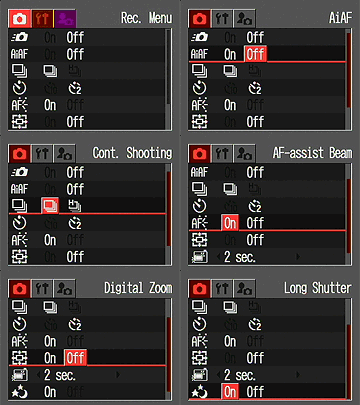 Quick
Shot: Turns Quick Shot option on or off. Quick Shot allows camera
to fire without bothering to confirm focus, reducing shutter lag somewhat.
Camera defaults to infinity and fires.
Quick
Shot: Turns Quick Shot option on or off. Quick Shot allows camera
to fire without bothering to confirm focus, reducing shutter lag somewhat.
Camera defaults to infinity and fires.
- AiAF: Turns on the AiAF focus system. If switched off, the camera bases autofocus on the center of the frame.
- Continuous Shooting: Designates whether the Continuous Shooting drive setting is set to Standard (1.5 frames per second) or High Speed (2.5 frames per second) modes.
- Self-Timer: Sets the Self-Timer countdown to two or 10 seconds.
- AF Assist Beam: Turns the AF assist light on or off. If on, the light automatically activates in low lighting.
- Digital Zoom: Enables the digital zoom function, which is engaged by zooming past the optical zoom range. Also disables digital zoom.
- Review: Turns the instant review function on or off, or sets the amount of time that the captured image is displayed on the screen from two or 10 seconds. (Still images only.)
- Long Shutter: Activates Long Shutter mode, so that it appears
in the Function menu.
- Setup Menu
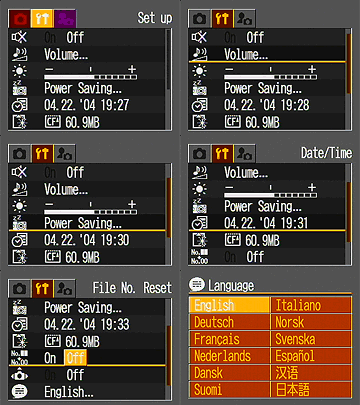 Beep:
Designates whether a beep sound plays when the Shutter button is pressed.
Beep:
Designates whether a beep sound plays when the Shutter button is pressed.
- Volume: Adjusts Startup, Operation, Self Timer, Shutter, and Playback volume. (secondary screen)
- LCD Brightness: Adjusts the brightness of the LCD display. (secondary screen)
- Auto Power Down: Turns on the automatic shut down, which turns the camera off after a period of inactivity. Separate options are provided for display shutdown and camera sleep time. (secondary screen)
- Date/Time: Sets the camera's internal date and time settings. (secondary screen)
- Format: Formats the CompactFlash card, erasing all images (even write protected ones). (Option not available in Stitch-Assist mode.) (secondary screen)
- File No. Reset: Resets file numbering with each new CompactFlash card, if enabled. If disabled, the camera continues file numbering from card to card.
- Auto Rotate: If enabled, reflects the camera's orientation in the LCD monitor.
- Language: Changes the menu language to one of 12 languages. (secondary screen)
- Video System: Establishes the type of video signal, NTSC or PAL.
- My Camera Menu
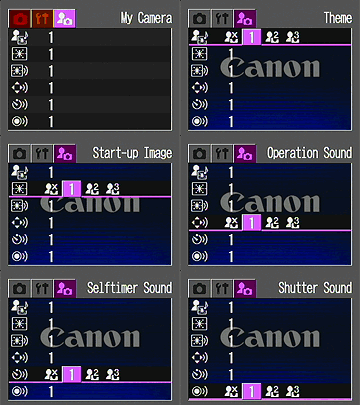 Theme:
Selects a common theme for each My Camera menu settings item. Four options
are available, the first one being Off. When a theme is selected, all
of the following settings automatically adjust to that theme.
Theme:
Selects a common theme for each My Camera menu settings item. Four options
are available, the first one being Off. When a theme is selected, all
of the following settings automatically adjust to that theme.
- Start-Up Image: Sets the startup image when you turn on the camera to: Black screen, Canon logo, Canon logo w / sunset, and nature scene. You can also apply your own image directly from images stored on the Compact Flash card. Once "registered" the images stay with the camera regardless of the card used.
- Start-Up Sound: Sets the startup sound when you turn on the camera to: No sound, Musical tone (1), Musical tone (2), or Birds chirping. You can also apply your own sounds directly using the built in mic or Canon software.
- Operation Sound: Sets the sound when any control or switch is use (except the Shutter button). Options include Beep, Loud beep, Boing, and Chirp. You can also apply your own sounds directly using the built in mic or Canon software.
- Self-Timer Sound: Sets the sound that signals you when the shutter release is two seconds away. Options include Fast beeps (1), Fast beeps (2), Telephone ring, and Howling. You can also apply your own sounds directly using the built in mic or Canon software.
- Shutter Sound: Sets the shutter sound that you hear when you
depress the Shutter button (there is no shutter sound in Movie mode).
Options include Beep, Shutter sound, Boing, and Bark. You can also apply
your own sounds directly using the built in mic or Canon software.
Playback Menu: Accessed by pressing the Menu button in Playback mode, the Playback menu also has subject tabs for the Setup and My Camera menus described above.
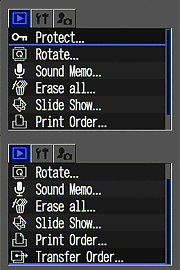 Protect:
Marks the current image for write-protection, or removes write-protection.
Protected images cannot be deleted or manipulated, except through card formatting,
which erases all files.
Protect:
Marks the current image for write-protection, or removes write-protection.
Protected images cannot be deleted or manipulated, except through card formatting,
which erases all files.
- Rotate: Rotates the current image 90 degrees clockwise.
- Sound Memo: Records a short sound clip to accompany a captured image.
- Erase All: Erases all files on the memory card, except protected ones.
- Slide Show: Automatically plays all captured images in a slide show.
- Print Order: Determines how many copies of the current image will be printed, with options for creating an index print, imprinting the date and time, and imprinting the file number.
- Transfer Order: Marks images to be transferred via email.
In the Box
Packaged with the PowerShot S410 are the following items:
- Wrist strap.
- Video cable.
- USB cable.
- 32MB CompactFlash memory card.
- NB-1LH lithium-ion battery pack.
- Battery charger.
- ArcSoft and Canon Digital Camera Solution Disk software CDs.
- Operating manual and registration card.
- Large capacity CompactFlash memory card (256 or higher).
- Additional NB-1LH lithium-ion battery pack.
- AC adapter kit.
- Small camera case.
Recommended Software: Rescue your images!
Just as important as an extra memory card is a tool to rescue your images
when one of your cards fails at some point in the future. I get a lot of email
from readers who've lost photos due to a corrupted memory card. Memory card
corruption can happen with any card type and any camera manufacturer, nobody's
immune. A surprising number of "lost" images can be recovered with
an inexpensive, easy to use piece of software though. Given the amount of
email I've gotten on the topic, I now include this paragraph in all my digicam
reviews. The program you need is called PhotoRescue, by DataRescue SA. Read
our review
of it if you'd like, but download the program now, so you'll have it.
It doesn't cost a penny until you need it, and even then it's only $29, with
a money back guarantee. So download PhotoRescue
for Windows or PhotoRescue
for Mac while you're thinking of it. (While you're at it, download
the PDF manual and quickstart guide as well.) Stash the file in a safe place
and it'll be there when you need it. Trust me, needing this is not a matter
of if, but when... PhotoRescue is about the best and easiest
tool for recovering digital photos I've seen. (Disclosure: IR gets a small
commission from sales of the product, but I'd highly recommend the program
even if we didn't.) OK, now back to our regularly scheduled review...
See camera specifications here.
Cycle times, shutter lag, battery life, etc. can be found here.
- Canon PowerShot S410 user reviews on PriceGrabber.com
- Canon PowerShot S410 user review on PC PhotoREVIEW
Sample Pictures
See the
full set of my sample pictures and detailed
analysis here. The thumbnails below show a subset of my test images.
Click on a thumbnail to see the full-size photo.
 |
 |
 |
| |
|
|
|
|
|
|
| |
|
|
|
|
|
|
| |
|
|


Test Results
In keeping with my standard test policy, the comments given here summarize only my key findings. For a full commentary on each of the test images, see the S410 Digital ELPH's "pictures" page.
Not sure which camera to buy? Let your eyes be the ultimate judge! Visit our Comparometer(tm) to compare images from the S410 with those from other cameras you may be considering. The proof is in the pictures, so let your own eyes decide which you like best!
As with all Imaging Resource product tests, I encourage you to let your own eyes be the judge of how well the camera performed. Explore the images on the pictures page, to see how the S410's images compare to other cameras you may be considering.
- Color: Very good to excellent color, under a variety
of light sources. I have always been a fan of Canon's Digital ELPH color
rendering, and the S410 is no exception. The camera did a great job with color
throughout my testing, producing vibrant, accurate color under a variety of
light sources. The Auto and Manual white balance settings both produced good
color, though I frequently chose the Manual setting as the most accurate.
Skin tones were good, and the camera handled the difficult blue of the flower
bouquet in the outdoor and indoor portraits quite well. The Musicians shot
threw the camera's white balance system slightly, but here again, the Manual
setting produced the best, most believable results. Colors were bright and
accurate on the Davebox target, though the additive primaries were a just
slightly oversaturated. Under the strong incandescent lighting of my Indoor
Portrait test, I was surprised by how much better the S410's flash shots looked,
with much less of the color cast from the room lighting present in the final
images. All in all, an excellent job.
- Exposure: Accurate exposure, somewhat high contrast
under harsh lighting though. The S410 handled most of my test lighting
well, requiring an average amount of exposure compensation on the high-key,
harshly-lit Outdoor Portrait. The harsh lighting on that shot produced rather
high contrast, with lost detail in the highlights: Not uncommon, but more
lost detail than I'd prefer to see, although the S410 seemed to do a bit better
to my eye than the S500 did. The difference was very slight, but for a similar
level of highlight loss, the S410 seemed to show more shadow detail, suggesting
that its dynamic range is a little better. The camera distinguished the subtle
tonal variations of the Q60 target on the Davebox quite well, and shadow detail
was good as well. Indoors, the camera required an average amount of positive
exposure compensation (+1.0 EV on the Indoor Portrait without flash) to get
a bright exposure.
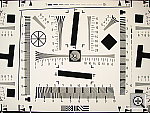
- Resolution/Sharpness: High Resolution, 1,100 lines of
"strong detail." The S410 performed well on the "laboratory"
resolution test chart. It started showing artifacts in the test patterns at
resolutions as low as 800 lines per picture height, in both horizontal and
vertical directions. I found "strong detail" out to 1,100-1,150
lines. (Actually, resolution is a little hard to call on the S410, as there's
what appears to be meaningful detail visible well beyond the 1,150 line point,
but there's also very strong aliasing. Some reviewers might be inclined to
go as far as to say that there's 1,300+ lines of resolution here, but my conservative
nature says to call it quits when the aliasing gets as strong as the primary
detail.) "Extinction" of the target patterns didn't occur until
about 1,450 lines.
- Image Noise: Noticeable even at ISO 50, but probably not objectionable
for most users until ISO 400. With higher CCD resolutions, the pixels
are getting smaller, and so image noise is becoming more apparent than in
earlier generations of cameras. The S410 exemplifies this trend, in that there
is slight but visible image noise, even in its ISO 50 images. For most users
though, the results at ISO 50 and 100 will likely be OK, 200 marginal, and
only ISO 400 really objectionable. Also, as you'd expect due to its slightly
larger pixels, the S410 shows slightly less noise than its higher-resolution
sibling, the S500.
- Closeups: Excellent macro performance. The S410
did a very good job in the macro category, capturing a minimum area of only
2.18 x 1.63 inches (55 x 41 millimeters). Resolution is very high, and detail
was strong in the dollar bill, coins, and brooch. Details were softer in the
coins and brooch, due the close shooting range. There's also some softness
in all four corners of the frame, but this is fairly typical for digicam macro
shots. The S410's flash throttled down pretty well for the macro area, though
its position on the camera resulted in a dark shadow in the lower right corner.
(Plan on using external lighting for the closest macro shots with the S410.)
- Night Shots: Excellent low-light performance, with great
color balance and low noise. The S410 did an excellent job here, and produced
clear, bright, usable images down to the 1/16 foot-candle (0.67 lux) limit
of my test at all four ISO settings. Color was good throughout the series,
even at the darkest light levels. Given the S410's slightly higher-than-average
noise under daylight conditions, I found the noise here surprisingly low in
most cases, and even at ISO 400 was lower than I had anticipated. The S410
is also helped in its low light shooting by a bright autofocus assist illuminator,
that lets it focus even in complete darkness. (At least on nearby subjects.)
- Viewfinder Accuracy: Excellent accuracy from the LCD
monitor, but the optical viewfinder is rather tight. The S410's optical
viewfinder is quite tight, showing 82 percent frame accuracy at wide angle,
and about 77 percent at telephoto. The LCD monitor fared much better, showing
about 98 percent frame accuracy at both wide angle and telephoto settings.
Given that I like LCD monitors to be as close to 100 percent accuracy as possible,
the S410's LCD monitor is essentially perfect in this regard, but its optical
viewfinder could definitely use some help.
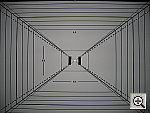
- Optical Distortion: Average geometric distortion, some
problems with coma and/or flare. Optical distortion on the S410 is about
average at the wide-angle end, where I measured approximately 0.7 percent
barrel distortion. The telephoto end fared much better, as I measured only
0.09 percent barrel distortion there. The S410's lens has some problems with
coma and/or flare in the corners of the frame though, with a fair bit of softness
evident, particularly along the left side. That said, chromatic aberration
doesn't appear to be all that strong, as there's only fairly weak color visible
on the fringes of the target elements. (This distortion is visible as a very
slight colored fringe around the objects at the edges of the field of view
on the resolution target.)
- Battery Life: Good battery life for a compact model, but a good idea to buy an extra battery anyway. With a worst-case run time of about 94 minutes on a fully-charged battery, the S410's battery life is on the good side of average for a compact model. Also, while I didn't measure its run-down time with the LCD turned off, it seems to be at least several hours. Nonetheless, my standard advice to purchase a second battery along with the camera still stands.
| Free Photo Lessons | |
|

(For a camera with the same great features as the S410 but slightly higher resolution, check out its near-twin, the five-megapixel PowerShot S500. - I do have to say though, that I think the S410 is actually the better deal.)


Follow Imaging Resource: